 Explore packages ↗
JCA MACRO ECONOMIC SUITE
More context.
A clearer perspective.
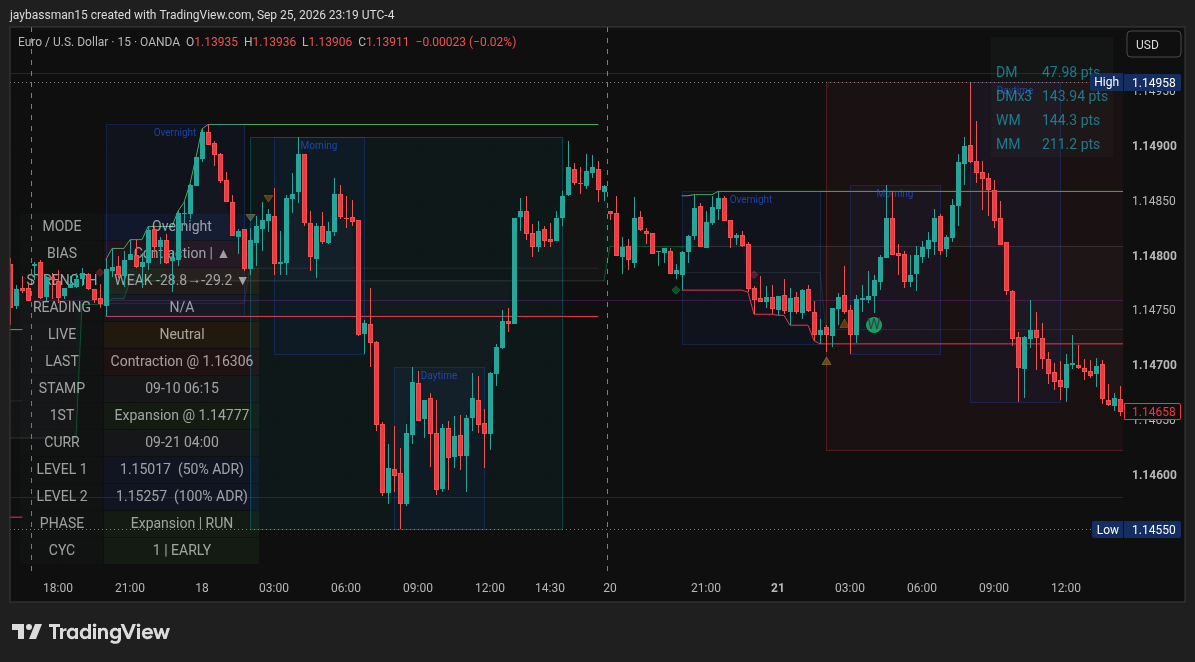
A connected set of visual analysis tools for TradingView. Bring time-of-day context, macro readings and chart markers into one considered workspace.
WATCH. EXPLORE. GET STARTED.
See the suite. Find your starting point.
Watch the overview, then explore the user guide at your own pace.
JCA Macro Economic Suite overview · 1 minute 22 seconds
Your JCA Macro Economic Suite user guide
Start with a flower or dot, then learn the dashboard, chart setup, bridges and visual displays for JCA Macro Core, JCA Macro Yield and JCA Macro Equity.
WHY JCA WAS BUILT
One chart.
A shared foundation.
JASON BRAMBLE Founder’s perspective
After more than 18 years studying markets, Jason Bramble kept returning to one question: why could people look at the same chart and reach completely different conclusions?
JCA grew from his focus on macroeconomics—bringing economic data and price context into a shared analytical framework, rather than relying only on subjective chart patterns.
The purpose is not to guarantee an outcome or eliminate judgement, but to give people a consistent, data-informed starting point for their analysis.
ONE FOUNDATION. TWO SPECIALIST TOOLS.
Designed to work
together.
JCA Macro Core is the companion layer.
Pair it with JCA Macro Yield or JCA Macro Equity—or bring all three into your toolkit.
JCA Macro CoreContext
Time-of-day displays, range references and pivot levels help organise the chart around a common visual framework.
The shared starting point
JCA Macro Yield — Relative yield and currency context
Provides relative yield and currency context, distinct analysis markers, and the JCA Macro Core companion for a structured study workflow.
Includes its own analysis markers
JCA Macro EquityAdaptive context
Uses instrument-specific macro inputs and a separate channel-based reversal display, alongside JCA Macro Core.
Different tools—not identical calculations
LOOK INSIDE
See the information.
Understand the context.
A structured dashboard
Read the displayed bias, strength and indicator state together—not as isolated numbers.
Distinct visual markers
Flowers, dots and optional diamonds represent different conditions; they are not interchangeable.
Context before conclusions
JCA Macro Yield uses relative-yield exhaustion for its reversal-dot logic, separately from its macro reading.
FIND YOUR FIT
Choose the approach.
Then choose the package.
Relative-yield analysis
For a workflow built around the relationship between two currency yields, with macro context and separate exhaustion markers.
Explore JCA Macro Yield →Instrument-specific analysis
For a workflow using instrument-specific macro inputs and a separate channel-based reversal display.
Explore JCA Macro Equity →Both approaches
Choose this when you want both specialist indicators. JCA Macro Core is included once as their shared companion.
Explore the bundle →Different calculations can produce different markers. The bundle provides both tools—not confirmation that their outputs will agree.
CHOOSE YOUR WORKSPACE
One package. A connected toolkit.
Two specialist packages. One complete suite. Pay manually in USDT (TRC-20) for monthly access.
THE MACRO YIELD PACKAGE
JCA Macro Core + JCA Macro Yield
Amount to send · Includes JCA’s 1 USDT fee allowance.
The companion and relative-context pairing.
- JCA Macro Core companion indicator
- JCA Macro Yield specialist indicator
- Session and reference displays
- Macro dashboard and visual markers
THE MACRO EQUITY PACKAGE
JCA Macro Core + JCA Macro Equity
Amount to send · Includes JCA’s 1 USDT fee allowance.
The companion and adaptive-context pairing.
- JCA Macro Core companion indicator
- JCA Macro Equity specialist indicator
- Session and reference displays
- Macro dashboard and visual markers
THE COMPLETE BUNDLE
The JCA Macro Economic Suite
Amount to send · Includes JCA’s 1 USDT fee allowance.
Both specialist tools, with the shared foundation.
- JCA Macro Core companion indicator
- JCA Macro Yield specialist indicator
- JCA Macro Equity specialist indicator
- 4 USDT less than paying for both packages separately
USDT on TRON (TRC-20) only · Manual payment verification and access setup · TradingView is a separate service.
The package, at a glance.
| Included indicator | Macro Yield package | Macro Equity package | Complete bundle |
|---|---|---|---|
| JCA Macro Core | Included | Included | Included |
| JCA Macro Yield | Included | — | Included |
| JCA Macro Equity | — | Included | Included |
A CLEAR START
Know the steps
before you join.
Manual payment and access setup.
No automatic recurring charges.
- 01
Choose your package
Review the tools and select the pairing that fits your analysis workflow.
- 02
Connect your identity
Email your package choice and TradingView username to JCA. Confirm availability and your access dates before sending payment.
- 03
Set up your workspace
After JCA verifies receipt and grants access, add the included indicators. Your confirmation will state your access start and expiry dates.
MANUAL MONTHLY PAYMENT
Your toolkit.
Your next month.
Pay with USDT on TRON (TRC-20). No card checkout or automatic subscription is created here.
1. Confirm your access
Have a referral? Include their code before your first payment. JCA verifies the referral and keeps it against your customer record for paid renewals.
Email your package choice and TradingView username before paying. JCA will confirm availability, access dates and payment details.
Confirm access by email →2. Send the correct amount
Send 40 USDT
The displayed amount includes JCA’s 1 USDT fee allowance. Your sending provider may charge additional fees; check its final transfer preview before confirming.
Asset: USDT · Network: TRON (TRC-20)
Do not send another asset or use another network.
Receiving address
TZ7vYFLieZdVhrnHFLpFxcpSDPB1TFfgPg
3. Request verification
After sending, use the payment-report form to submit your transaction hash (TXID), package, customer email and TradingView username. Include your referral code if you have one. Never send a password, recovery phrase or private key.
Submit payment details securely →Access is granted only after JCA verifies the funds received. A screenshot alone is not payment confirmation. Each payment may be used only once.
Your monthly access
Renew manually for another month. If you do not renew, access ends on the expiry date in your confirmation; there is no automatic charge.
Payments are non-refundable except where applicable law requires otherwise. Contact JCA before payment if anything is unclear.
Payment receipt, verification and access activation are manual. This page does not monitor your wallet or activate indicators automatically.
BEFORE YOU DECIDE
Good questions.
Clear answers.
Understand the tools,
the requirements and the limits.
Is JCA Macro Core included in every package?
Yes. The Macro Yield package includes JCA Macro Core and JCA Macro Yield. The Macro Equity package includes JCA Macro Core and JCA Macro Equity. The complete bundle includes all three.
Do I need TradingView?
Yes. These are indicators for TradingView, not a standalone application. TradingView’s plan limits and any separate subscription costs must be considered when setting up your workspace.
Are JCA Macro Yield and JCA Macro Equity the same indicator?
No. They have different underlying calculations and reversal logic. Their shared companion is JCA Macro Core; buying the bundle does not make their markers or alerts identical.
Do the indicators guarantee results?
No. They provide visual analysis references, not guaranteed outcomes. Historical examples do not establish future performance, and markers are not executed orders.
Can historical displays change?
Indicators recalculate when reloaded. Data revisions, loaded history, settings and timeframe can affect the results. No blanket claim of permanently fixed historical markers is made.
How will billing, cancellation and access work?
Payment is manual, once per paid monthly period; there are no automatic renewals or recurring charges. Confirm availability and access dates with JCA before paying. To stop, do not renew: access remains until the confirmed expiry date. Payments are non-refundable except where applicable law requires otherwise. Payment verification and TradingView access are handled manually, not automatically by this page.
GROW WITH JCA
Share the tools.
Build the community.
Referral reward: 20% of verified referred payments, including each paid monthly renewal.
7.80 USDT per specialist package or 15 USDT for the complete bundle, excluding the 1 USDT payment allowance.
Apply through the Affiliate Portal. Email verification and JCA approval are required. Approved affiliates can view referral links and commissions, and confirm a public USDT TRC-20 payout address by email. Payments are verified by JCA; commissions are calculated on approved payments and sent manually each week.